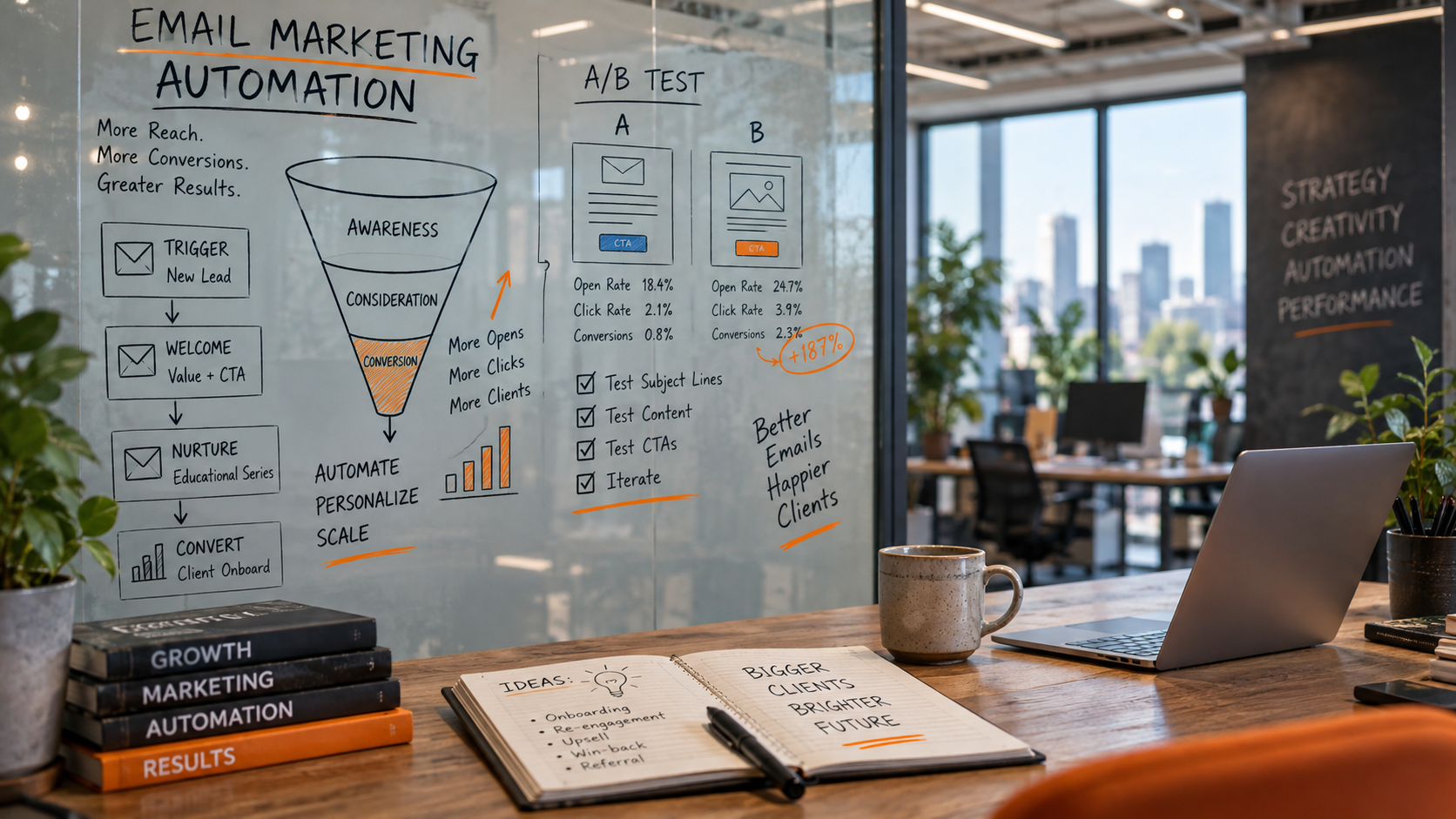
Email marketing automation workflow examples help performance marketing agencies turn campaign data into timely, relevant customer journeys. Instead of sending every subscriber the same message, an automated workflow uses defined triggers, conditions, and actions to respond to behavior such as downloading a guide, abandoning a form, attending a webinar, or becoming a qualified sales opportunity.
For agencies working across paid ads and PPC optimization, conversion rate optimization, SEO and content strategy, and marketing analytics, email automation can connect acquisition activity with measurable follow-up. It can also support B2B lead generation tactics, landing page testing, social media ad campaigns, and ROI tracking and attribution.
What Is an Email Marketing Automation Workflow?
An email marketing automation workflow is a sequence of email messages and related actions that runs when a specific event occurs. The event may be a form submission, a subscription, a purchase, a change in lead status, or a period of inactivity. The workflow then evaluates rules and sends messages according to the subscriber’s profile, consent, behavior, and stage in the customer journey.
A basic workflow usually contains five elements:
- Trigger: The event that starts the workflow, such as submitting a landing page form.
- Audience: The contacts who are eligible to enter the workflow.
- Conditions: Rules that determine which path a contact follows.
- Actions: Emails, database updates, notifications, or audience changes.
- Exit criteria: Events that remove a contact, such as requesting a sales conversation or opting out.
For a performance marketing agency, the workflow should have a business purpose that can be connected to a measurable outcome. That outcome might be a qualified meeting, a product trial, a completed purchase, or a retained customer. Opens and clicks can help diagnose delivery and content performance, but they should not be treated as the final measure of marketing effectiveness.
Why Agencies Use Email Automation

Email automation can extend the value of traffic acquired through paid ads, search, social platforms, and content. A visitor who is not ready to convert on the first visit may still become a useful lead when the company offers a relevant resource and follows up with appropriate information.
Automation also gives agencies a repeatable operating model. The team can define the intended journey, document its logic, connect it to a customer relationship management system, and review results across accounts. This creates a stronger link between campaign execution and performance reporting.
There are trade-offs. Automation requires accurate data, clear consent, careful segmentation, and regular maintenance. Poorly designed workflows can send irrelevant messages, create duplicate communications, or continue contacting people after they have entered a different sales or customer stage. Automation improves consistency, but it does not replace strategy, useful content, or human judgment.
Email Marketing Automation Workflow Examples
1. New Subscriber Welcome Workflow
A welcome workflow begins when someone subscribes to an email list. Its purpose is to establish expectations, deliver the promised value, and introduce the company in a controlled way.
A practical sequence could include:
- Message one: Confirm the subscription and provide the requested resource.
- Message two: Explain the type and frequency of future communications.
- Message three: Share a useful guide, checklist, or educational article related to the subscriber’s stated interest.
- Message four: Invite the subscriber to identify a business need or select a preferred topic.
The workflow should use the source of the subscription as a condition. Someone who joined through a paid search campaign for B2B lead generation may need different content from someone who subscribed after reading an SEO article about landing page design and testing.
Agencies can assess this workflow by reviewing delivery, unsubscribes, content engagement, and subsequent conversion events. The analysis should also compare downstream results by acquisition source. A high volume of subscribers has limited value if those contacts do not progress toward the intended business outcome.
2. Lead Magnet Delivery and Nurture Workflow
This workflow starts when a prospect downloads a report, template, webinar recording, or other gated resource. The first email should deliver the resource immediately. Later messages can help the prospect apply it and understand the related problem.
For example, an agency offering conversion rate optimization services could create the following path:
- Deliver a landing page audit checklist.
- Explain how to prioritize issues by potential impact and implementation effort.
- Show how message consistency between a paid ad and its landing page affects the visitor experience.
- Offer a self-assessment or consultation request when the prospect has received enough context.
Behavioral conditions make the sequence more useful. A contact who visits a case study page may receive a message about implementation. A contact who repeatedly reads introductory content may receive more educational material. A contact who requests a sales conversation should leave the nurture sequence and enter the appropriate sales process.
The main limitation is intent ambiguity. A download may indicate curiosity rather than purchase readiness. Treating every download as a sales qualified lead can reduce trust and make attribution reports misleading.
3. Paid Ads Lead Follow-Up Workflow
Paid campaigns often produce leads at different levels of quality. An automated follow-up workflow can provide immediate information while the lead is still familiar with the offer. It can also send useful context to a sales team without pretending that every form completion has equal value.
The workflow should capture relevant campaign information, such as the platform, campaign, ad group, creative, landing page, and offer. Consistent tracking parameters make it easier to connect the email journey with paid ads and PPC optimization reports.
A suitable sequence might include:
- Confirm the form submission and provide the promised next step.
- Answer a common question associated with the offer.
- Provide a relevant example or comparison framework.
- Ask a qualifying question or invite the prospect to book a suitable next step.
- Notify the sales team when the contact meets defined engagement and qualification rules.
Agencies should take care with frequency. A person may already be receiving retargeting ads, social media ad campaigns, and communications from another workflow. Contact policies should account for the complete marketing program rather than evaluating one automation in isolation.
4. Webinar Registration and Attendance Workflow
A webinar workflow can support both attendance and post-event conversion. Registration should trigger confirmation, calendar details, and practical access information. Reminder messages can be scheduled according to the event date, with different treatment for people who have already attended or watched a recording.
After the event, divide contacts by behavior:
- Attendees may receive a summary, supporting resources, and a relevant next step.
- Registrants who did not attend may receive a recording or an invitation to a later session.
- People who asked a question or visited a product page may be routed to a more specific follow-up.
- Contacts who are not ready for a commercial conversation may return to a broader educational program.
This workflow is useful for B2B campaigns because registration, attendance, content engagement, and sales activity can be analyzed as separate stages. It also illustrates why attribution needs defined rules. A webinar may assist a later conversion without being the first or last interaction.
5. Lead Scoring and Sales Handoff Workflow
Lead scoring workflows assign values to explicit information and observed behavior. Explicit information might include company size, role, region, or stated project timing. Behavioral signals might include visiting a pricing page, viewing a service description, or replying to an email.
A responsible scoring model should document why each signal matters. It should also include negative or time-based adjustments. A contact who visited a page many months ago may not have the same current intent as someone who engaged recently.
When a lead crosses the agreed qualification threshold, the workflow can update the CRM, create a task, notify an owner, and pause promotional nurture emails. The sales handoff should include the source and relevant context, while respecting data minimization principles.
Scoring is useful for prioritization, but it is not a reliable substitute for a conversation or validated qualification process. Agencies should compare scores with actual sales outcomes and revise the model when the relationship weakens.
6. Abandoned Form or Application Workflow
An abandoned form workflow can help recover visitors who began a meaningful action but did not complete it. Depending on the context, the first message may remind the person that their information was not submitted or offer assistance with common questions.
The workflow should only run when the business has a lawful basis and appropriate consent to send the message. It should avoid exposing sensitive information in the subject line or email body. The timing should reflect the user experience and the importance of the form. A short service inquiry may justify a simple reminder, while a complex B2B application may need more explanation and a human contact option.
Conversion rate optimization teams can compare completion rates before and after the workflow, but they should also review complaint rates, unsubscribes, and lead quality. Recovering more forms is not beneficial if the recovered submissions are irrelevant or create a poor customer experience.
7. Customer Onboarding Workflow
Email automation is also valuable after conversion. An onboarding sequence can explain setup steps, introduce support resources, and encourage the customer to reach an early success milestone.
For a marketing service, onboarding messages might request access to analytics platforms, confirm tracking requirements, explain reporting terms, and outline the first review process. For software, the sequence might guide the customer through account configuration and core features.
The workflow should respond to progress. Customers who complete setup can move to an advanced education path, while customers who stall can receive help content or a support notification. A clear exit condition prevents onboarding emails from continuing after the customer has moved into an established account-management stage.
8. Re-Engagement and List Hygiene Workflow
A re-engagement workflow targets contacts who have not interacted for a defined period. The purpose is to confirm continued interest and protect list quality. Messages can ask subscribers to update preferences, choose topics, or remain subscribed.
If a contact does not respond, the business may suppress future promotional messages according to its policy. This can reduce the apparent size of the list while improving the reliability of engagement reporting. It also helps prevent the team from designing campaigns around contacts who no longer want communication.
Inactive status should be based on more than one signal where possible. Email interaction can be incomplete because of privacy features, blocked tracking, or reading behavior that does not register as a click. Recent website activity, account status, and direct preference information may provide additional context.
How to Build an Effective Workflow
Define the business objective
Start with one intended outcome. Examples include increasing qualified consultations from an organic content offer, improving trial activation, or reducing the time between a paid lead and a sales response. Avoid combining unrelated goals in one workflow.
Map the customer journey
Document what the contact knows, what question they are likely to have next, and what action should follow. Include entry conditions, decision points, handoffs, and exits. This map should align with SEO and content strategy, paid media, landing page design, sales operations, and customer support.
Check data and consent
Verify that the platform records the fields and events the workflow needs. Review subscription status, regional requirements, suppression lists, and contact frequency rules. Relevant legal frameworks may include the European Union’s General Data Protection Regulation and the United States CAN-SPAM Act. Requirements depend on the organization, audience, message type, and jurisdiction, so legal advice may be appropriate.
Write useful messages
Each email should answer a likely question or help the reader take a reasonable next step. Use clear language, descriptive links, accessible formatting, and a recognizable sender. Avoid implying certainty about a prospect’s private behavior or using sensitive data in ways the person would not expect.
Connect measurement systems
Use consistent campaign naming and tracking parameters. Connect email events with the CRM, advertising platforms, analytics tools, and revenue records where appropriate. Define whether reporting uses first-touch, last-touch, position-based, time-decay, or another attribution method. No attribution model perfectly reconstructs the customer’s decision process, so results should be interpreted as a measurement convention.
Test carefully
Test subject lines, message order, calls to action, form fields, timing, and audience rules. A test should have a defined hypothesis and a decision rule. Review both immediate indicators and downstream outcomes. An email variation that generates more clicks may still produce fewer qualified opportunities or more unsubscribes.
Pros and Cons of Email Automation
Advantages:
- It provides timely follow-up without requiring a manual send for every contact.
- It can tailor content to source, behavior, lifecycle stage, and stated preferences.
- It gives agencies a repeatable framework for managing multiple campaigns.
- It supports ROI tracking and attribution when event data is connected correctly.
- It can improve consistency between ads, landing pages, content, sales, and onboarding.
Limitations:
- Automation depends on reliable data, integrations, and deliverability.
- Behavioral signals may be incomplete or misinterpreted.
- Workflows require ongoing review as offers, products, regulations, and customer needs change.
- Complex branching can become difficult to audit and maintain.
- Automation can increase message fatigue when teams do not coordinate contact policies.
Q&A
How many emails should an automated workflow contain?
There is no universal number. Use enough messages to answer the relevant questions and support the intended decision, then stop or change the path when the contact takes a meaningful action. A short confirmation workflow may need one or two messages, while a longer B2B education sequence may require more.
Should every lead enter a nurture sequence?
No. Exclude unsubscribed contacts, existing customers where the content is irrelevant, active sales opportunities, duplicate records, and contacts who do not meet the workflow’s consent and eligibility rules.
How should an agency measure email automation?
Measure delivery and engagement for diagnosis, then connect the workflow to the business outcome. Depending on the campaign, useful measures include qualified lead rate, meeting rate, trial activation, purchase rate, revenue, retention, unsubscribe rate, and assisted conversion patterns.
Can email automation replace paid advertising?
Email automation and paid advertising perform different roles. Paid campaigns can create targeted demand and test messages quickly, while email can develop permission-based relationships with known contacts. The strongest programs coordinate both channels and evaluate them within the same customer journey.
When should an agency rebuild a workflow?
Review a workflow when its objective changes, the audience changes, conversion quality declines, data fields become unreliable, or the message sequence no longer reflects the customer experience. Rebuild it when the underlying logic is difficult to explain or when multiple exceptions have accumulated.
Final Considerations for Performance Marketing Agencies
The best email marketing automation workflow examples share a clear purpose, a defined audience, useful content, and measurable exit conditions. They connect campaign acquisition with customer progress while leaving room for human judgment and customer preferences.
Agencies should treat automation as part of a broader performance system. Paid ads and PPC optimization may create the initial visit. SEO and content strategy may create discovery. Landing page testing may improve the first conversion. Email automation can support the next decision, while analytics and attribution help the team evaluate the combined journey.
Before launching, review consent, data protection, deliverability, accessibility, frequency limits, and attribution assumptions. Marketing performance can affect business spending and revenue decisions, so results should be treated as decision support rather than guaranteed financial outcomes. The GDPR and CAN-SPAM Act are named reference points for privacy and commercial email practices, but organizations should confirm the rules that apply to their audience and jurisdictions with qualified legal counsel.
Sources
- General Data Protection Regulation (GDPR), official regulation text and explanatory materials.
- Federal Trade Commission, CAN-SPAM Act: A Compliance Guide for Business.
- Google Analytics Help, attribution and advertising measurement documentation.
Leave a Reply