
Reliable conversion tracking is the foundation of profitable Google Ads management. Without accurate data, a performance marketing agency may optimize toward incomplete leads, duplicate transactions, unqualified form submissions, or actions that do not reflect business value. A well-built tracking system connects paid search activity with real outcomes, making it easier to improve campaigns, landing pages, budgets, and customer acquisition processes.
This Google Ads conversion tracking checklist is designed for marketers, in-house teams, and agencies managing lead generation, ecommerce, and multi-channel growth programs. It covers account setup, conversion definitions, Google Tag Manager, enhanced conversions, imported offline results, attribution, quality assurance, and ongoing optimization.
1. Define What Counts as a Conversion
Before configuring tags, decide which customer actions matter to the business. A conversion should represent meaningful progress toward revenue, not simply any interaction with a website.
Separate primary and secondary actions
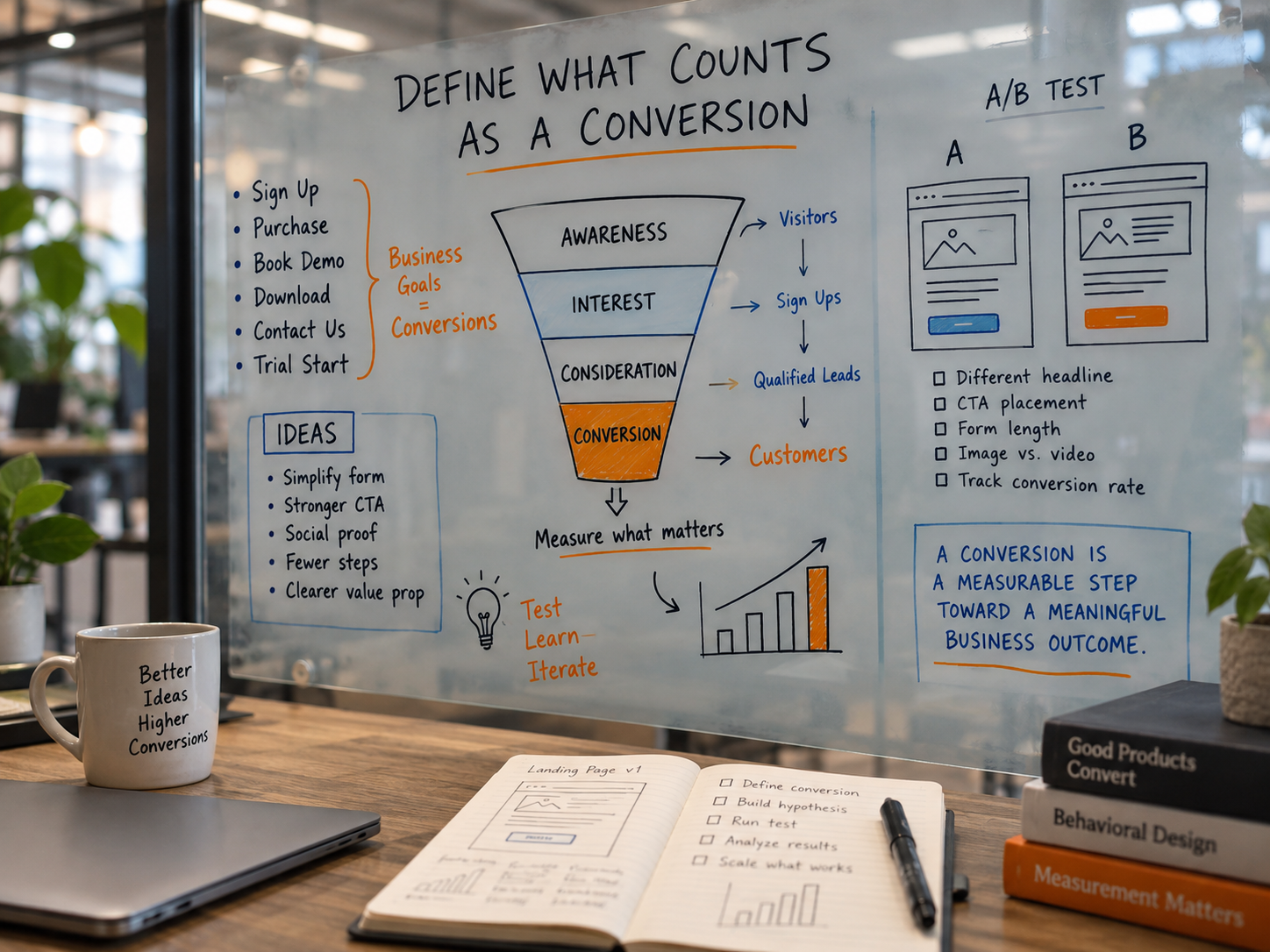
Primary conversions should influence bidding and budget decisions. Examples include:
- Completed purchases
- Qualified demo requests
- Sales calls that meet defined criteria
- Completed application forms
- Booked consultations
- Confirmed account registrations for a product-led business
Secondary conversions are useful for analysis but may not belong in the main bidding goal. Examples include:
- Brochure downloads
- Newsletter sign-ups
- Video views
- Pricing page visits
- Chat starts
- Engagement with a calculator or product configurator
Classify each action in a shared measurement plan. For every conversion, document its business purpose, source system, trigger, responsible owner, expected value, and whether it should be included in the account-level conversion goals.
2. Create a Conversion Measurement Plan
A measurement plan prevents inconsistent naming and makes reporting easier as campaigns expand. It should connect marketing activity to the stages of the customer journey.
For a B2B lead generation program, the journey may include:
- Ad click
- Landing page visit
- Form submission
- Marketing-qualified lead
- Sales-accepted lead
- Opportunity
- Closed-won customer
For ecommerce, the journey may include product views, add-to-cart events, checkout starts, purchases, refunds, and repeat purchases. The correct structure depends on the business model and the data available in the CRM or commerce platform.
Use consistent conversion names such as Lead – Demo Request, Lead – Contact Form, or Purchase – Online Store. Avoid vague names such as Form Complete 2 because they become difficult to interpret across campaigns and reporting systems.
3. Audit Google Ads Conversion Settings
Open the conversion summary in Google Ads and review every existing action. Look for duplicates, outdated tags, actions from previous agencies, and conversions that are no longer relevant.
Check the following settings:
- Goal category: Confirm that the category matches the action, such as purchase, submit lead form, sign-up, or phone call.
- Optimization setting: Decide whether the action is a primary conversion used for bidding or a secondary action used for observation.
- Counting method: Use “Every” for purchases and transactions where each conversion has value. Use “One” for many lead actions when repeated submissions from one ad interaction should not inflate performance.
- Conversion window: Align the window with the typical buying cycle. Longer B2B sales processes may require a different approach from short ecommerce journeys.
- View-through window: Review whether view-through conversions are appropriate for the campaign type and reporting needs.
- Value settings: Use transaction revenue where available. For leads, assign values based on expected business value rather than choosing arbitrary numbers.
Do not assume that the default settings are correct. A conversion action can be technically active while still producing misleading data.
4. Choose the Right Tracking Implementation
Google Ads conversions can be implemented directly through the Google tag, Google Tag Manager, a supported website platform, or imported from another system. The best option depends on the site architecture, consent requirements, development resources, and the need for offline data.
Google Tag Manager
Google Tag Manager is useful when marketers need control over tags, triggers, variables, and versioned changes without editing site code for every update. A typical setup includes:
- A Google tag installed across the site
- A conversion linker configured where required
- Conversion event tags for key actions
- Triggers based on thank-you pages, form events, data layer messages, or transaction confirmation
- Variables that pass transaction IDs, values, currencies, and lead details
Use a data layer for important ecommerce and form information rather than relying only on fragile page URL rules. Document every tag and trigger so another team member can audit the setup.
Platform-based implementations
Shopify, WordPress, HubSpot, Salesforce, and other platforms may offer native integrations. These can reduce implementation time, but they still require testing. Review whether the integration supports transaction IDs, refunds, consent signals, enhanced conversions, cross-domain journeys, and offline conversion imports.
5. Prevent Duplicate Conversions
Duplicate conversions are one of the most common causes of unreliable paid ads reporting. They can occur when a user reloads a confirmation page, when both a native platform tag and Google Tag Manager fire, or when a form event and thank-you page are counted for the same action.
Use the following controls:
- Fire purchase conversions once per unique transaction ID.
- Choose one authoritative implementation for each conversion action.
- Do not count both a button click and the completed form unless they represent separate business actions.
- Test page refreshes and browser back-button behavior.
- Check whether a confirmation page can be accessed directly without a completed transaction.
- Compare Google Ads conversions with the CRM, payment processor, or order management system.
For lead forms, server-side confirmation or a unique form submission ID is often more reliable than a generic click trigger.
6. Configure Enhanced Conversions and Consent Signals
Enhanced conversions can improve measurement by using consented, first-party customer information in a privacy-conscious way. Depending on the implementation, data such as an email address or phone number may be normalized and hashed before being sent to Google.
Before enabling the feature, confirm that:
- The website privacy notice accurately describes relevant data practices.
- Consent management is configured for the regions and audiences being served.
- Only permitted data is collected and transmitted.
- Form fields are mapped correctly.
- Data is normalized consistently, including capitalization, spacing, and country formats.
- The implementation has been tested in Google Tag Assistant or the relevant platform diagnostics.
Enhanced conversions are not a substitute for a clear consent framework or sound first-party data governance. Involve legal, privacy, and engineering stakeholders when the implementation requires it.
7. Connect Google Analytics 4 and Google Ads Carefully
Google Analytics 4 and Google Ads serve different purposes. Google Ads supports campaign management and bidding, while Analytics provides broader behavioral and cross-channel analysis. Linking the platforms can improve visibility, but importing every Analytics event into Google Ads may create clutter or duplicate goals.
Review:
- Whether auto-tagging is enabled
- Whether the Google tag and Analytics configuration are consistent
- Which Analytics events are marked as key events
- Which key events are imported into Google Ads
- Whether imported events duplicate native Google Ads conversions
- Whether cross-domain tracking is required
Use a single primary source for each bidding conversion. If a purchase is tracked natively in Google Ads and imported from Analytics, decide which action is authoritative and place the other in a secondary role or remove it from bidding goals.
8. Track Phone Calls and Offline Outcomes
Phone calls may be central to lead generation, especially for professional services, local businesses, healthcare, and high-consideration B2B products. Configure call conversions based on meaningful criteria, such as calls from ads, calls from the website, or calls that last beyond a defined threshold.
Call tracking should connect marketing data with the eventual outcome. A long call is not automatically a qualified lead, so sales teams should record disposition, fit, opportunity status, and revenue potential in the CRM.
Offline conversion imports can help close the gap between an online lead and a later sales result. Depending on the setup, this may involve importing qualified leads, opportunities, or closed-won revenue using identifiers such as Google Click ID, enhanced conversions for leads, or another supported matching method.
Confirm that:
- Lead source and campaign data are stored in the CRM.
- Identifiers are captured at the time of conversion.
- Sales status values are standardized.
- Revenue is recorded consistently.
- Import timing matches the sales cycle.
- Rejected, duplicate, and refunded records are handled correctly.
9. Test Every Conversion Path
Never rely only on the Google Ads status column. Run controlled tests across desktop and mobile devices, major browsers, form types, checkout paths, and relevant domains.
A practical quality assurance process includes:
- Click a test ad or use a tagged test URL.
- Complete the desired action with valid test information.
- Use browser developer tools, Tag Assistant, or Google Tag Manager preview mode to confirm the tag fires.
- Verify that the conversion request includes the correct conversion ID and label.
- Confirm that the transaction value, currency, and transaction ID are accurate.
- Check that consent behavior matches the visitor’s choice.
- Repeat the action after refreshing or returning to the confirmation page.
- Compare the result with the CRM, ecommerce platform, or call system.
Test unusual scenarios as well. These include failed payments, form validation errors, multi-step forms, pop-up forms, single-page applications, redirects, cookie restrictions, and users who leave the site before the final confirmation.
10. Align Conversion Tracking With Landing Page Testing
Conversion rate optimization depends on trustworthy measurement. If a landing page test changes the form event, confirmation flow, or URL structure, tracking may be affected even when the page appears to work normally.
Before launching an A/B test, document:
- The conversion event that defines success
- The secondary engagement metrics being monitored
- The page variants included in the experiment
- The expected event sequence
- The analytics and advertising tags used by each variant
Optimize for qualified outcomes whenever possible. A page that generates more low-intent submissions may look successful in Google Ads while producing weaker sales results. Connect form data to CRM stages so landing page decisions reflect business quality, not just volume.
11. Build Reporting Around ROI and Attribution
Conversion tracking should support decisions about budget, creative, audiences, search terms, landing pages, and sales follow-up. A useful report may include:
- Cost
- Clicks and engagement
- Primary conversions
- Qualified leads
- Opportunities
- Revenue or estimated pipeline value
- Cost per qualified lead
- Cost per opportunity
- Return on ad spend or return on marketing investment where appropriate
Compare Google Ads attribution with CRM and analytics perspectives. These systems may assign credit differently because they use different lookback windows, channels, identity signals, and reporting rules. The goal is not to force every platform to show identical numbers. The goal is to understand the differences and use a consistent decision framework.
For example, Google Ads may show the role of paid search in generating or assisting conversions, while the CRM may prioritize the source associated with the original lead or the most recent sales interaction. Both views can be useful when interpreted within their purpose.
12. Review Tracking on a Regular Schedule
Conversion tracking can break after website redesigns, CRM migrations, consent platform updates, checkout changes, URL changes, or new advertising integrations. Establish a recurring audit rather than waiting for performance to decline.
A monthly or quarterly review should cover:
- Conversion volume compared with internal systems
- Sudden changes in conversion rate or value
- Tag diagnostics and warning messages
- New or duplicate conversion actions
- Consent and privacy behavior
- Offline import match rates and data freshness
- Campaign goal settings
- Changes to forms, checkout, call tracking, or landing pages
- Attribution and reporting differences
Keep a change log with dates, owners, affected tags, and validation results. This is especially important for a performance marketing agency managing multiple accounts and coordinating with client developers, sales teams, and technology vendors.
Google Ads Conversion Tracking Checklist
- Business outcomes and conversion definitions are documented.
- Primary and secondary actions are clearly separated.
- Conversion names, categories, values, and counting methods are accurate.
- Only one authoritative tag or import is used for each primary action.
- Transaction IDs prevent duplicate purchases.
- Lead forms fire only after successful submission.
- Enhanced conversions and consent signals are configured appropriately.
- Google Analytics 4 imports do not duplicate native Google Ads conversions.
- Phone calls are tracked according to meaningful qualification rules.
- CRM and offline conversion data are connected where needed.
- Desktop, mobile, browser, and multi-domain paths have been tested.
- Landing page experiments preserve conversion measurement.
- Reports connect ad spend with qualified outcomes and revenue.
- A recurring audit and change log are in place.
Q&A
How many Google Ads conversions should an account track?
Track the actions needed to understand the customer journey, but keep bidding goals focused on meaningful outcomes. Too many low-value actions can make optimization less precise.
Should every form submission be a primary conversion?
No. A form submission can be primary when it represents a valuable lead. If it is an early inquiry, duplicate request, or low-intent action, classify it as secondary or connect it to later CRM qualification.
Why do Google Ads and CRM conversion totals differ?
Differences can result from attribution models, time zones, conversion windows, deduplication rules, consent limits, delayed imports, canceled transactions, or different definitions of a qualified conversion.
Is Google Tag Manager required?
No. Direct site tags, native platform integrations, and server-side methods can also work. Google Tag Manager is useful when a team needs centralized tag management and structured testing.
How often should conversion tracking be audited?
Review it after every major website, CRM, checkout, consent, or campaign change. A scheduled monthly or quarterly audit helps identify issues before they distort budget and optimization decisions.
Final Takeaway
A Google Ads conversion tracking checklist is more than a tag installation document. It is a measurement framework linking paid ads, PPC optimization, landing page design, CRO, SEO and content strategy, social media campaigns, email automation, sales operations, and revenue reporting.
Start with clear business definitions, implement one dependable source for each conversion, test every customer path, and connect online actions with qualified offline outcomes. When tracking is treated as an ongoing operational process, a performance marketing agency can scale campaigns with greater confidence and make optimization decisions based on business value rather than incomplete platform signals.
Leave a Reply